What you need
- A WooCommerce store (WordPress 4.6+, PHP 5.6+) where you can install plugins.
- An Android phone with Android 8.0 (Oreo) or newer, a SIM that can send SMS, and an internet connection.
- A checkout that collects the customer’s billing phone number.
Step 1: Install the plugin
- In WordPress admin go to Plugins → Add New.
- Search for Free SMS for WooCommerce (or open it on WordPress.org), click Install Now, then Activate.
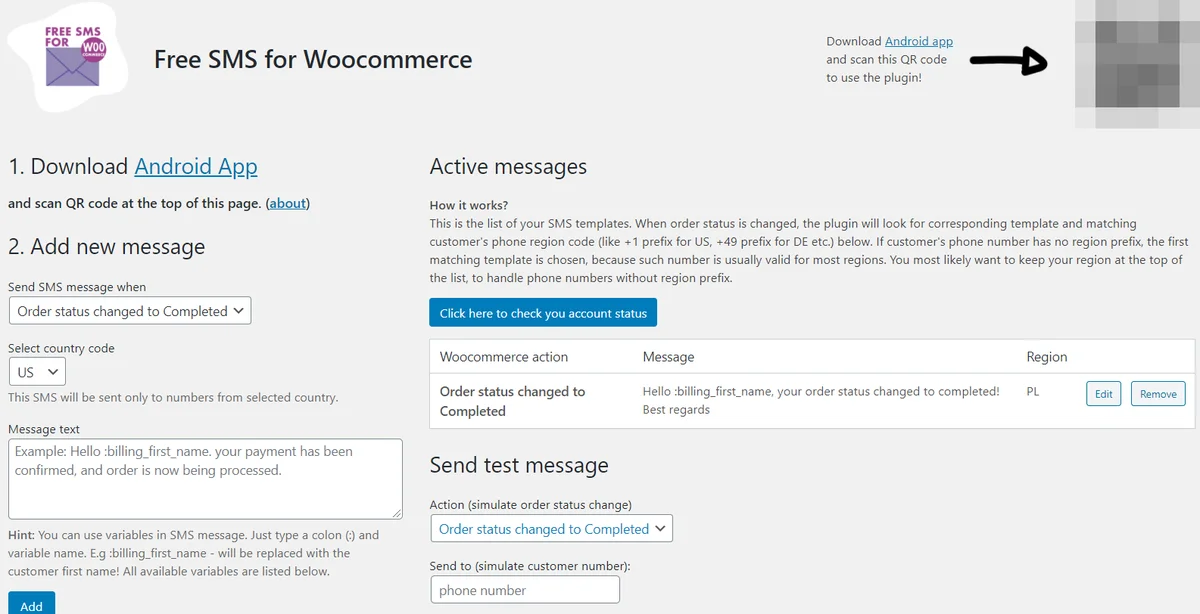
- A new Free SMS for WooCommerce entry appears in the admin menu. Open it: you see a QR code in the top corner of the page. Activation generates a random pairing token for your site; the QR code encodes it.
Step 2: Install the Android app
- On your Android phone open smsforwoocommerce.gitlab.io and tap Download app.
- Open the downloaded file. Android will ask you to allow installs from your browser (“Install unknown apps”). Allow it for this install.
- Open the app and grant the Camera permission (to scan the QR code) and the SMS permission (to send texts).
Why an APK? The app isn’t on Google Play (see the FAQ). It only asks for Camera, Send SMS and Internet permissions and is fully open source, so you can read or build it yourself. More in the FAQ.
If you see “There was a problem parsing the package”, your Android is older than 8.0.
Step 3: Pair the phone with the QR code
- In the app tap Scan new QR code.
- Point the camera at the QR code on the plugin settings page in your WordPress admin.
- You see a You’re all set! message. You can close the app now: messages are sent in the background.
Step 4: Write your message templates
In the Add new message form choose:
- Send SMS message when: the order status that should trigger the text (Completed, Processing, Pending payment, On-hold, Failed, Refunded or Cancelled).
- Country code: the customers’ country. The text is only sent to billing numbers valid for that country. Add the same message again for other countries if you ship abroad.
- Message text: your text, with variables. Type a colon and a variable name, for example
:billing_first_name.
Example templates you can copy:
Processing: Hi :billing_first_name, thanks for your order! We are packing it now.
Completed:  Hi :billing_first_name, your order has shipped. Total: :total :currency. Thank you!
Refunded:   Hi :billing_first_name, your refund of :total :currency has been processed.
Available variables include :status, :currency, :total, :billing_first_name, :billing_last_name, :billing_company, :billing_city, :billing_country, :shipping_first_name, :shipping_city, :payment_method_title, :date_created_date and the other billing/shipping address fields. The settings page shows the complete list for your version.
How templates are matched: when an order changes status, the plugin goes through your templates from top to bottom and sends the first one that matches the status and is valid for the customer’s country. So a customer gets one SMS per status change. Put your home country first so phone numbers entered without a country prefix match it.
Step 5: Send a test message
Scroll to Send test message on the settings page, pick a status, type your own phone number and send. The text should arrive from your phone within seconds. The test fills in sample values for the variables.
Step 6: After it is running
- Change an order’s status in WooCommerce (or place a test order). The customer gets the matching SMS and the app lists it.
- Keep the phone on and online. It needs mobile signal for SMS and internet to receive the push from Firebase.
- Exclude the app from battery optimisation (the menu path differs by phone brand: look under Settings → Apps → the app → Battery) so the phone doesn’t put it to sleep. Some manufacturers are aggressive about this.
- Long messages are split into several SMS parts and your carrier may bill each part. Keep texts short: about 160 characters in plain GSM text, about 70 if you use emoji or non-Latin letters.
- Free plan: 30 messages per month. Check usage and upgrade on the pricing page.
Troubleshooting
Nothing arrives after a status change
Check the phone is online and the app isn’t battery-restricted; check you have a template for that exact status and the customer’s country; check the order has a billing phone number; and check you haven’t used up the 30 free messages.
The test message says the device is not registered
Scan the QR code again (Scan new QR code in the app). Make sure you scan the code on the plugin’s settings page, with the phone connected to the internet.
The phone number is rejected
Numbers are validated against the template’s country. A number without a country prefix is read as belonging to that country. Make sure there is a template for the customer’s country, or have the checkout require international format.
Messages get delayed
Usually a power-saving feature delaying background notifications. Disable battery optimisation for the app and keep the phone connected.
Still stuck? Ask on the support forum or email bjuriewicz (a) gmail.com.